
This guide covers the full path: buy USDT on Binance, then deposit it into NonVoip. You do not need crypto first. Wallet steps: How to deposit on NonVoip. After balance is available: How NonVoip works.
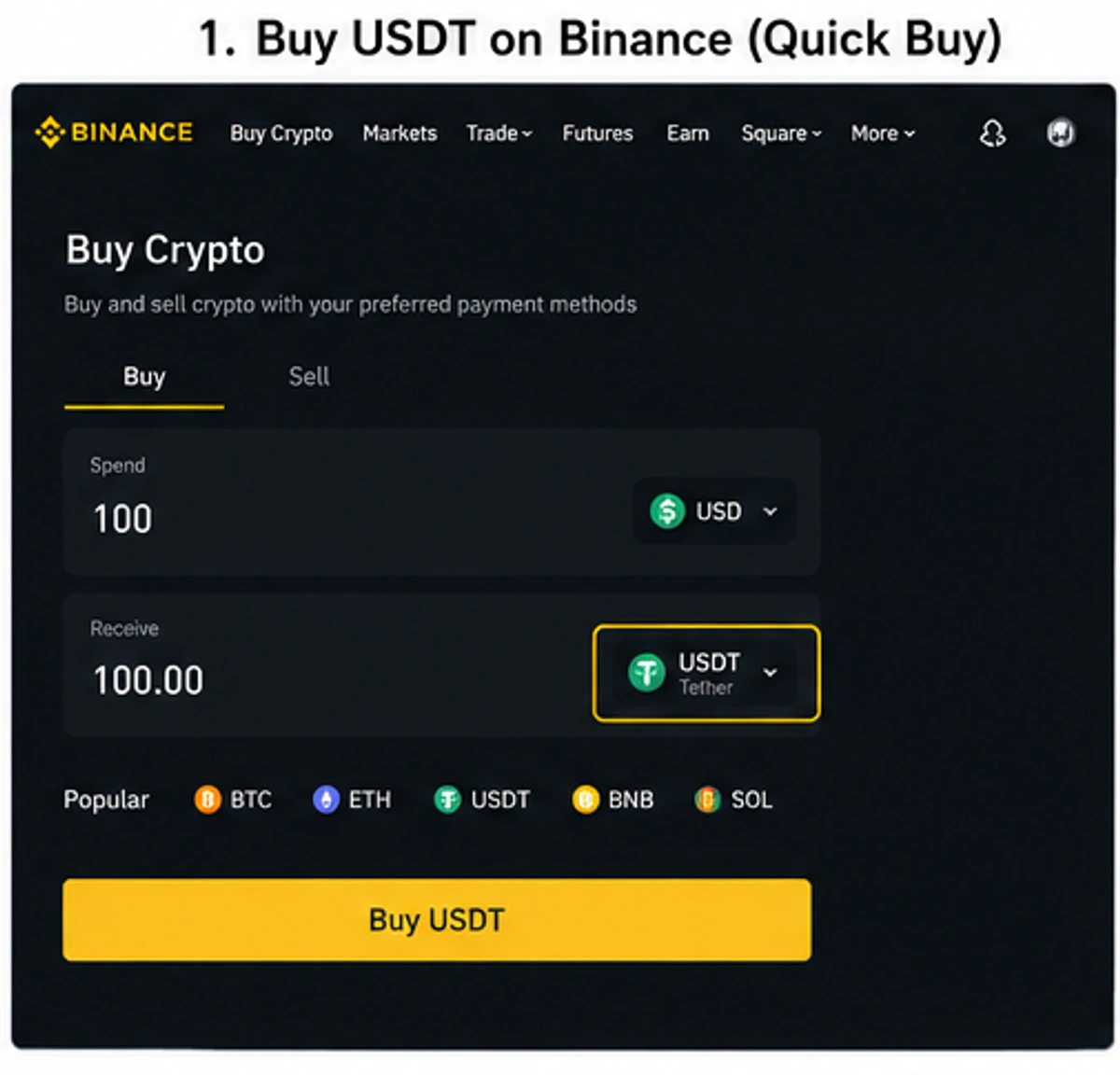
What do you need before you start?
- A NonVoip account
- A Binance account
- A payment method that Binance shows for your account and region
- Enough USDT to cover the amount you want to deposit, plus any network fee Binance shows at withdraw
If you do not have a Binance account yet, create one at Binance.com and complete any identity verification Binance requires. Card buy, P2P offers, and fees depend on your country and account.
How do you buy USDT with a credit or debit card?
If card purchases are available for your Binance account and region, this is usually the simplest path. This is Binance Buy Crypto—not Binance P2P.
- Log in to Binance and open Buy Crypto.
- Choose USDT as the cryptocurrency you want to receive.
- Select the credit or debit card option Binance shows (for example Visa / Mastercard), enter the amount, and review the rate and fees Binance displays.
- Complete the payment in Binance. When it finishes, USDT appears in your Binance account.
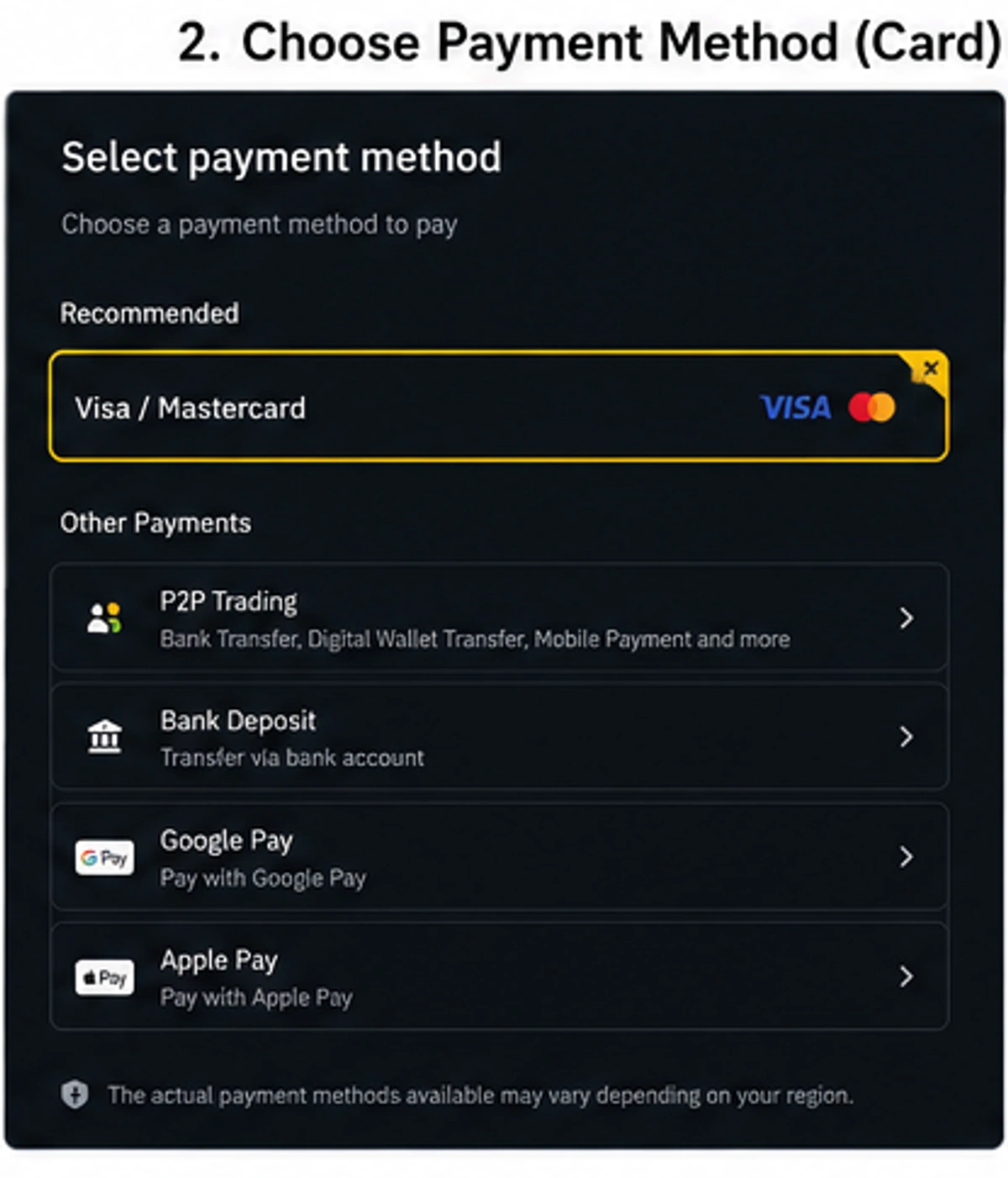
You can then send that USDT to NonVoip. If card buy is not listed for your region, use P2P instead.
How do you buy USDT through Binance P2P?
P2P is not a card checkout. You buy USDT from another Binance user using the payment methods on that seller’s offer—bank transfer, digital wallet, or other local methods the offer lists.
- In Binance go to Trade → P2P, then select Buy.
- Choose USDT and enter the amount you need.
- Review sellers: price, available amount, payment method, and order requirements. Pick an offer that matches a method you can actually pay.
- Follow the payment instructions inside the Binance P2P order. After you pay, mark the order as paid in Binance. Do not cancel after you have already sent payment.
- When the seller confirms, Binance releases USDT to your account.
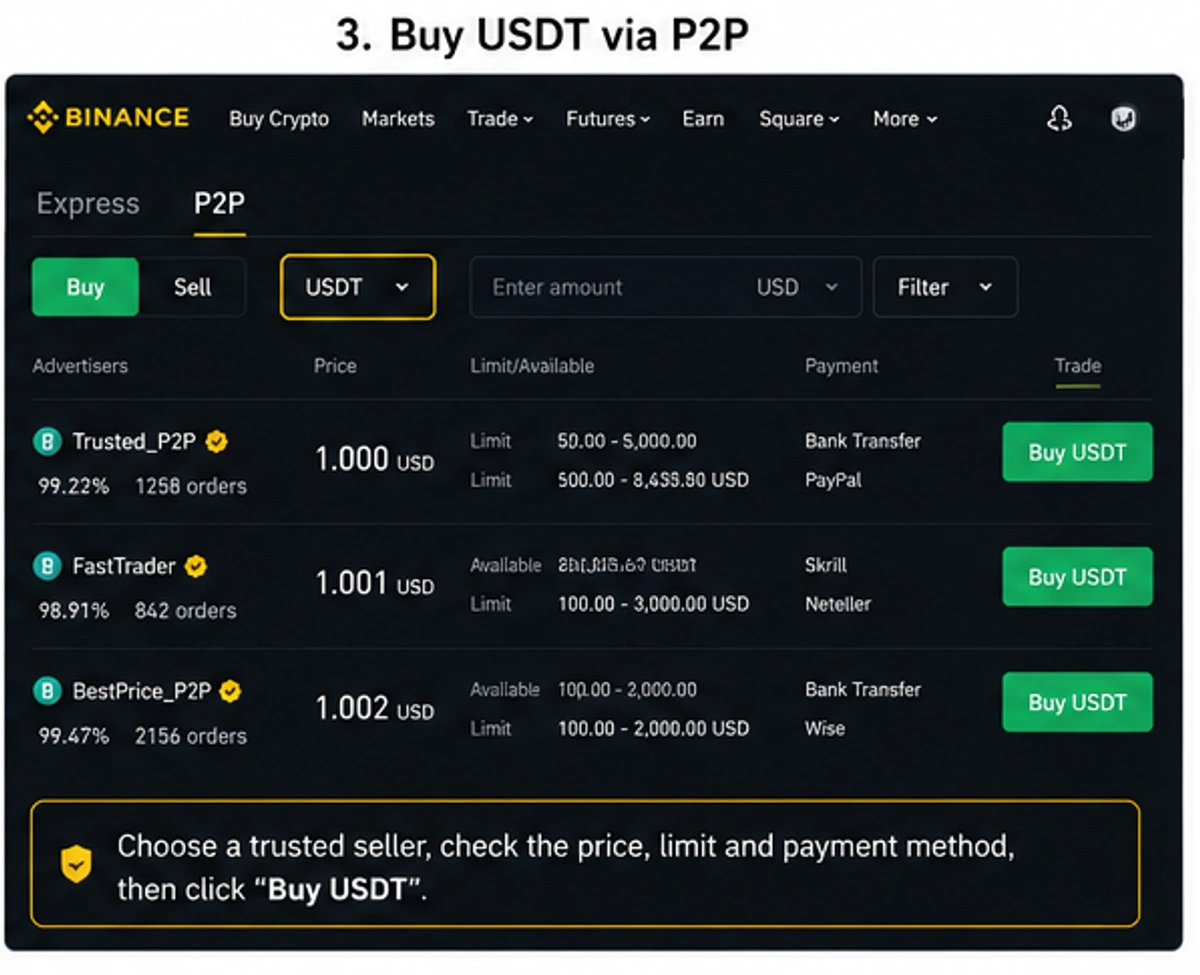
Only use payment methods and instructions shown in that P2P order.
How do you send USDT from Binance to NonVoip?
Once USDT is in Binance, send it to the deposit address in NonVoip Wallet.
- Sign in to NonVoip and open Wallet. Choose USDT and the network shown in Wallet, then create a deposit address if you do not already have one. Copy the address from Wallet—do not type it by hand.
- In Binance, open Withdraw → Crypto → USDT and paste your NonVoip address.
- Select the same network as the NonVoip Wallet card. Do not pick a different network because the fee looks lower. A mismatch means the deposit may not be credited.
- Enter the amount. Check USDT, address, network, and amount again. Complete Binance security checks and submit.
- Wait until the deposit is confirmed. Available Balance then updates. You can click Refresh balance in Wallet.
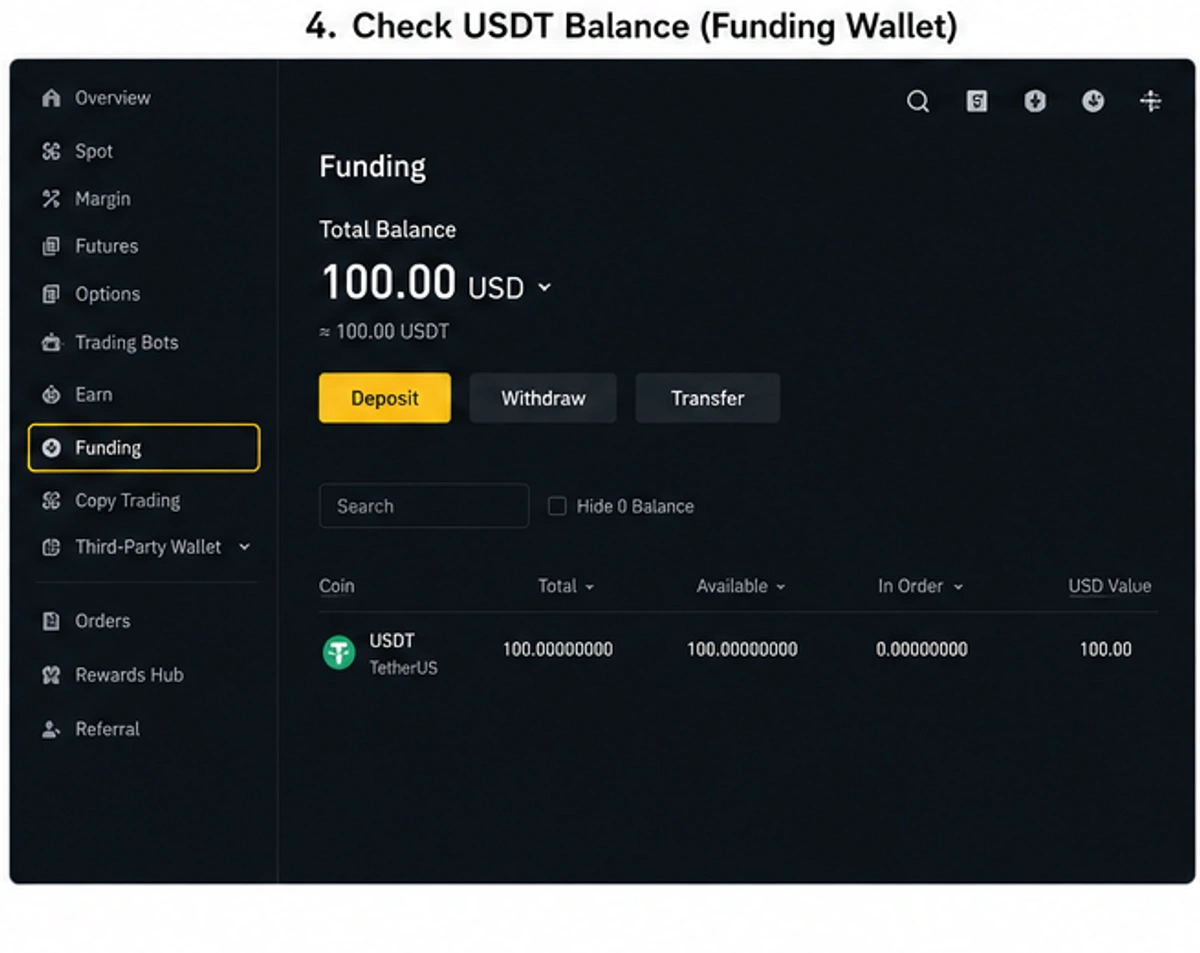
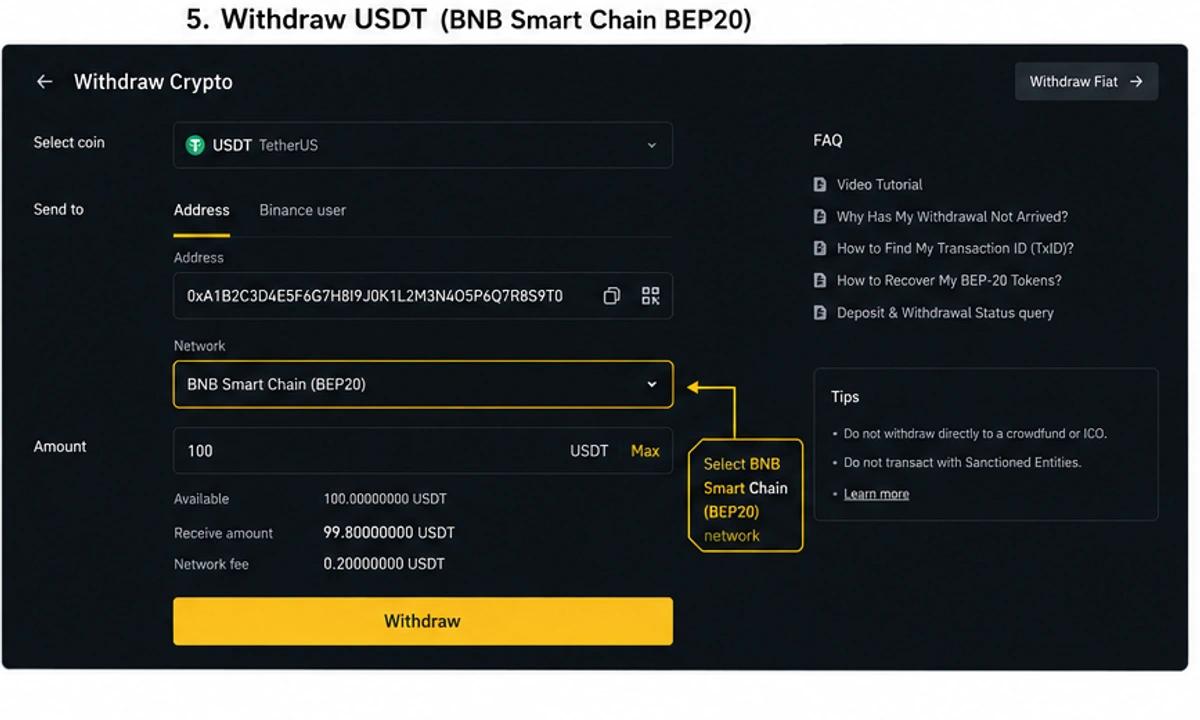
The withdraw screenshot may show BNB Smart Chain (BEP20) as an example. Use the network on your NonVoip Wallet card—not a network from this guide. Wallet details: How to deposit on NonVoip. Live offer prices: Pricing.
Can you pay NonVoip directly with a credit card?
NonVoip does not process credit or debit cards directly.
If Binance supports card purchases in your country, you can buy USDT with your card on Binance, then send that USDT to NonVoip:
Credit/debit card → Binance Buy Crypto → USDT → NonVoip Wallet
If card buy is not available, use a local method on a P2P offer:
Local payment method → Binance P2P → USDT → NonVoip Wallet
What should you check before sending?
- Copy the deposit address from NonVoip Wallet, then match USDT and the same network on Binance withdraw.
- Crypto transfers generally cannot be reversed after they are sent.
- Payment methods, card availability, fees, and P2P offers vary by country. Use only what Binance shows for your account.
- NonVoip and Binance are separate services. Your Binance account, verification, purchase, and withdrawal are handled by Binance.
If you are unsure which network to select, contact us before you send.
Frequently Asked Questions
Do I need crypto already?
No. Buy USDT on Binance first (card or P2P), then send it to NonVoip.
Is P2P the same as paying by card?
No. Card buy is Binance Buy Crypto. P2P uses the seller’s listed payment methods.
What if card buy is not available in my country?
Use Binance P2P with a payment method shown on an offer you can complete.
What if I pick the wrong network?
Funds may not be credited. Match the network on your NonVoip Wallet card before you withdraw from Binance.
Next step: Open Binance to buy USDT, then deposit from Wallet, or read How to deposit on NonVoip.